How-to: Niagara College Online Enrolment (NICOLE) System Navigation Basics
1) Log in to MyNC.
2) Explore your options.
After logging in you will land on the MyNC homepage.
- Go to the Dashboard to select your timetable, access your grades, print your tax receipts and much more.
- Go to Brightspace to access your course content.
- Go to More Applications to purchase your parking pass and much more.
Take a moment to become acquainted with the different options within MyNC.
Note that some options might not be available if you have not confirmed your Offer of Admission or paid your fees.
3) Go to the Dashboard and click the “Manage Registration” link to access the NICOLE system.
- Find the “My Student Record” section.
- Click the “Manage Registration” link.
- Click the “Select/Manage Timetable (NICOLE)” link.
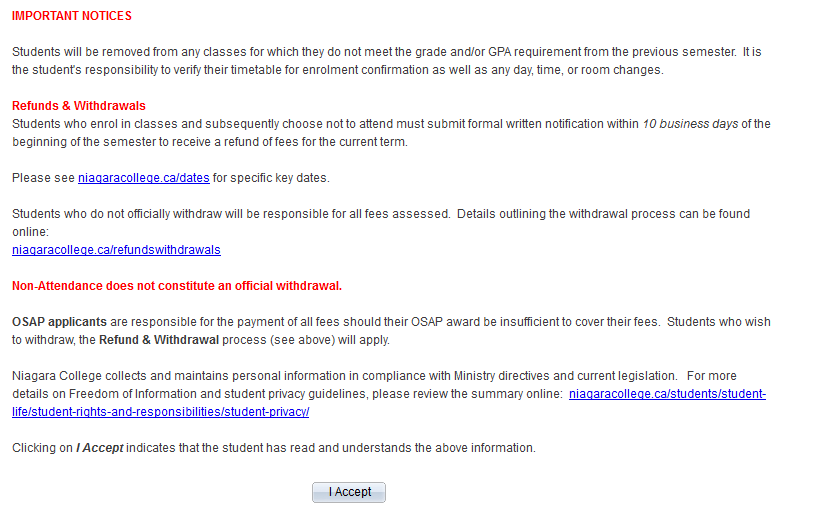
4) Accept the disclaimer that pops up.
Every time you log in to the NICOLE system, you will be asked to confirm acceptance of our Registration and Enrolment policies.
Please read this carefully, as the information can change from time to time, and then press “I Accept”.
5) Review the NICOLE home page.
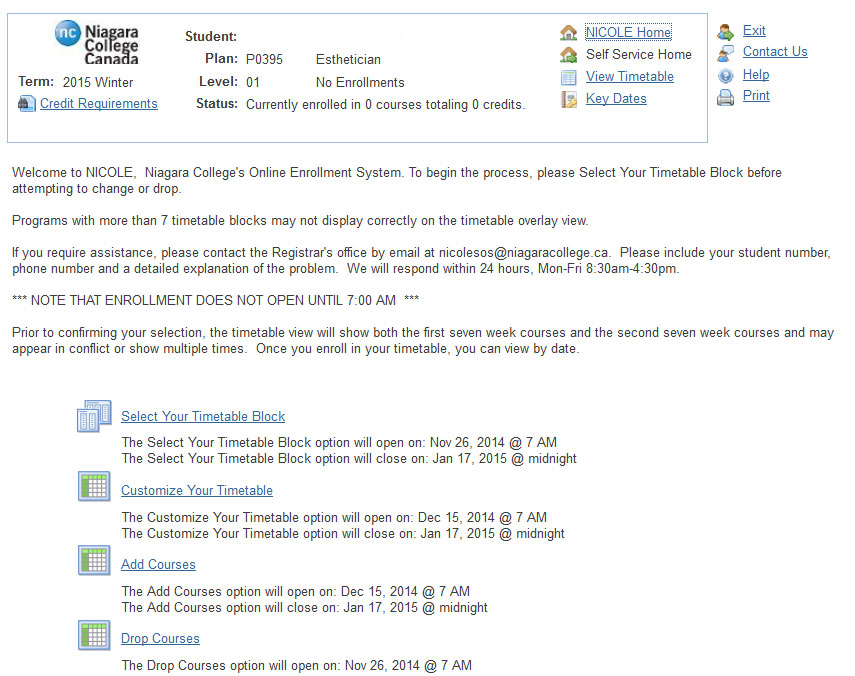
You will now be on your NICOLE home page.
- Be sure to check the “Welcome” message, as it will change from time to time.
- The top panel is specific to you and your program. Please ensure that your name, plan and level (term) are correct before proceeding.
- Take note of your status: in this example, the student has not begun enroling so none of the information is filled in. Once the enrolment process begins, these values will change to show full-time, part-time, and the actual number of courses and credits.
6) Review your credit requirements.
Within the top panel you will notice the “Credit Requirements” link. The Credit Requirements page will display the number of credits included in your full-time tuition, the minimum number of credits required to maintain full-time status, and the minimum number of credits required to remain eligible for OSAP. Credit values are specific to your program (plan) and term (level).
