How-to: Access Your President’s Honour Roll Letter
If you receive a term average of 90% or greater, your academic achievement is recognized by the college, and you will receive a letter of congratulations from the President of Niagara College.
1) Log in to MyNC.
2) Go to the Dashboard.
Once you are logged into MyNC click on the Dashboard icon.
3) Click the “Access Forms & Letters” link.
- Find the “My Student Record” section.
- Click the “Access Forms & Letters” link.

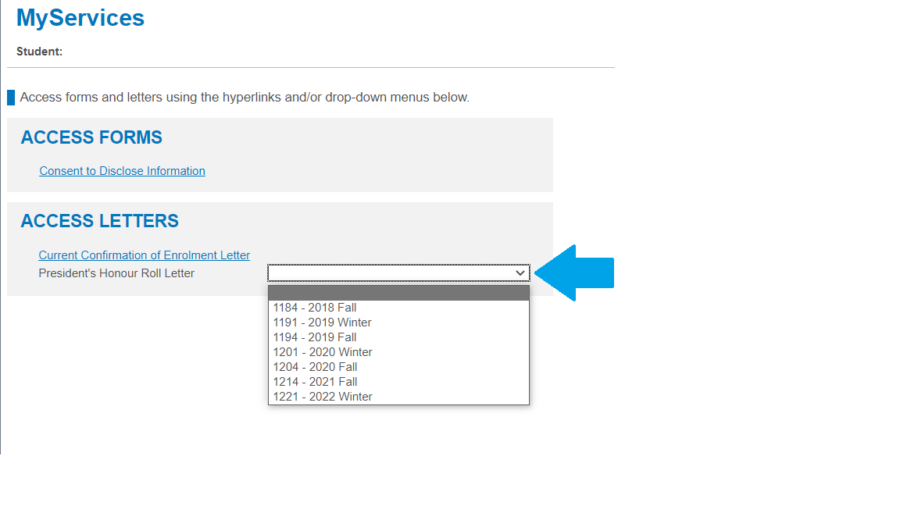
4) Access your letter using the drop-down menu.
Beside President’s Honour Roll Letter, select the term you received your award:
5) A new window will appear indicating that your report (document) is being generated.
A new window will open in your browser while your letter is generated. Please be patient.
Note: You must allow pop-ups in your browser in order to see the window.

6) Your letter will automatically be downloaded.
Once generated you will automatically download the letter.
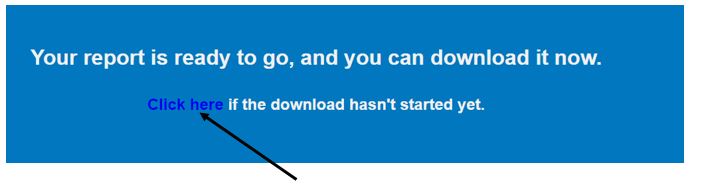
If your letter does not automatically download, click the “Click here if the download hasn’t started yet” link in the generation window.