How-to: Applicants – View Eligible Transfer Credits
1) Log in to MyNC.
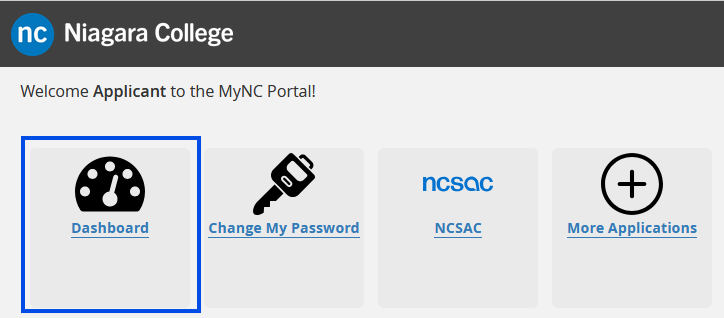
2) Go to the Dashboard.
Once you are logged into MyNC click on the Dashboard icon.
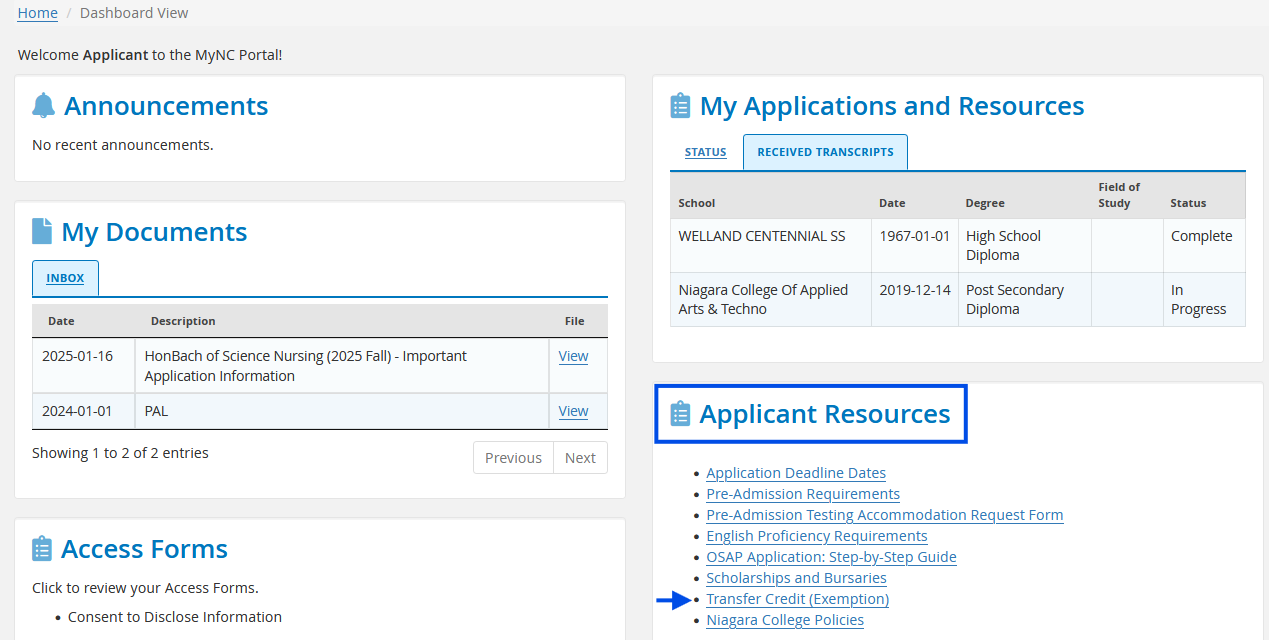
3) Look for “Applicant Resources”.
Locate the “Applicant Resources” section on the Dashboard. Select Transfer Credit (Exemption).
4) View Eligible Transfer Credits.
Use the drop down menu to view the eligible Transfer Credits from your previous Institution(s).
Viewing Your Transfer Credits (Exemptions)
On this page, you will see two columns: the left side lists the courses you’ve previously completed, and the right side shows your eligible transfer credits (exemptions). If a course in your program appears on your exemption list, it’s eligible for transfer*.
To confirm which courses are part of your program, visit your program page here.
Review and Confirm
It’s essential to review your Grade Report or Academic Advisement to ensure all eligible exemptions have been posted to your student record. If you do not see your exemptions reflected, email us at [email protected] with your Niagara College student ID number, program and Transcript institution the eligible transfer credits appear under so that we can assist you.
OSAP Recipients
Applying for transfer credits (equivalencies/exemptions), and/or PLARs (Prior Learning Assessment and Recognition) could change your course load and affect your OSAP eligibility. It is your responsibility to be aware of your course load requirements. If you are an OSAP recipient and are concerned about your credit load, please contact the Financial Aid office directly at: [email protected]
For more information, click here.
*Conditions apply for competitive Allied Health programs, Degree and Post Graduate programs.