
If you have more than one vehicle registered in your Honk Mobile account, you must select the plate/vehicle that is on campus via the Parking Session screen to avoid ticketing.
While Honk allows unlimited vehicles/plates to be registered in an account via the Customer Profile section, Niagara College parking permits only allow one vehicle per permit to be parked on campus at one time.
Please follow the steps below to change your plate when required within your active parking session.
- Tap the hamburger menu icon in the top left corner of the screen.

Screenshot shows HONK mobile app menu. Tap the 3 stacked bars in the top left corner for a menu of profile and parking session options.
- Choose the Sessions tab.
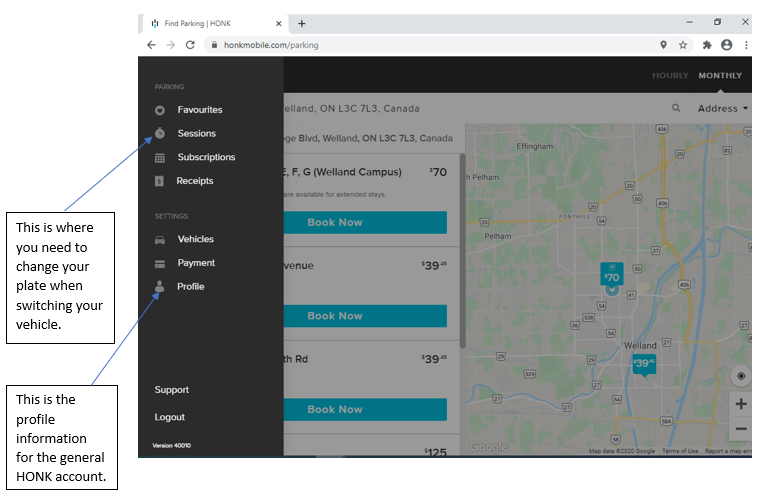
Screenshot shows HONK mobile app menu. Sessions: this is where you need to change your plate when switching your vehicle. Profile: contains your HONK account’s general information.
- Choose the current long-term permit session.
- Tap Change Vehicle and adjust the vehicle as needed.
Municipal bylaw enforcement for on-campus parking is completed via licence plate scans. Failure to have the correct vehicle/plate selected for your parking session will result in a ticket being issued.
For more information regarding Honk Mobile and on-campus parking permits, visit www.niagaracollege.ca/parking-services/permits/.
