
Since 2020, employees working remotely have had the option to leverage the MyWorkDrive service for accessing network files from the N: drive, G: drive and other network file shares.
Please note, the MyWorkDrive service is being discontinued on June 30, 2025 as part of our efforts to streamline services.
Starting June 30, you will need to use the GlobalProtect VPN (Virtual Private Network) app to access file shares remotely. GlobalProtect is only available to those using college issued computers at home. For security reasons, this service is not available for personally owned devices.
How to access the GlobalProtect VPN app:
The GlobalProtect VPN app should already be installed and available on your computer.
Windows users
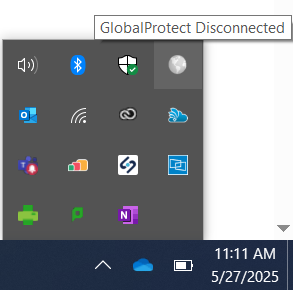
For Windows users, to launch the app, select GlobalProtect in your system tray, located at the bottom right of your task bar.
MAC users
For MAC users, to launch the app, select GlobalProtect from your “Go” menu, located at the top right of your screen.

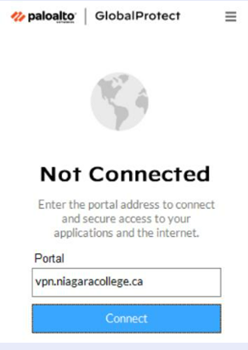
Next, enter vpn.niagaracollege.ca as the portal and select Connect.
If you have any questions or require further support, please contact ITS via:
- Submitting a ticket via our service catalogue
- Emailing [email protected]
Information Technology Services
