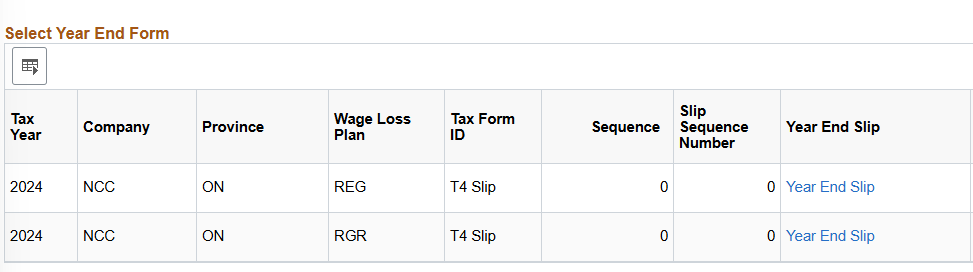

Staff and faculty can access their 2024 T4s by visiting the Oracle – Employee Self-Serve application on the MyNC Portal and selecting ‘View T4 and T4A slips’ under ‘My Pay Information.’ Please see the below images for details.
Staff that are not currently active will have their T4s mailed to the mailing address on file. Please note that employees who received payments during 2024 as both a Full-time and Part-Time employee and employees that switched employment groups during the year will have more than one 2024 T4 in the portal, these will be shown as multiple lines in View T4 (see step 3 image).
For assistance accessing your T4 through the MyNC portal, contact the ITS Service Desk at [email protected].
For assistance with specific questions regarding your T4, please contact the Payroll department at [email protected].
Step 1:
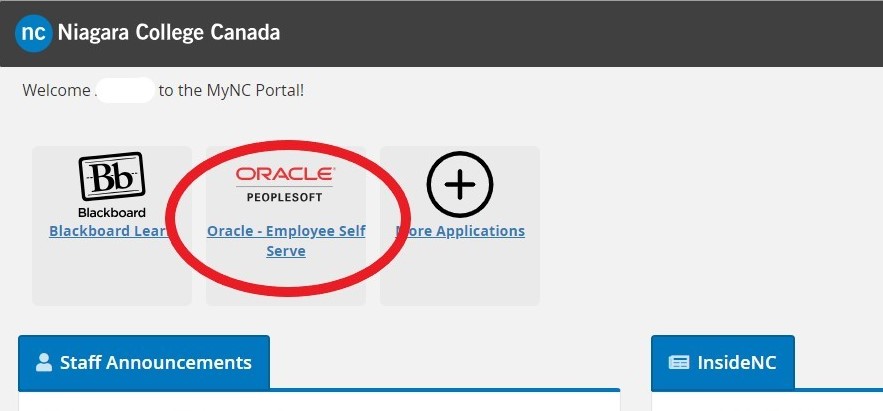
Step 2:

Step 3: