
A message from ITS:
ITS is excited to announce some significant updates to our Multi-Function Printers (MFPs) that will enhance your printing and scanning experience. These changes are designed to make your tasks easier and more efficient. Here are the key updates:
1. Scan to OneDrive: As an alternative to Scan to G, you can now scan documents directly to your OneDrive account, making it easier to store and share your files securely. For instructions to set this up, visit: its.niagaracollege.ca/scantoonedrive/
2. Follow-Me Print Queues: With Follow-Me print queues, you can send your print jobs to a central queue and release them at any Xerox MFP at any location. These queues have been automatically installed on all Employee and Lab computers across the college. To learn about the benefits of Follow-Me Print queues and how to use them, visit: its.niagaracollege.ca/followme-printing/
NOTE: This is the preferred printing method for all NC employees.
3. Self-serve printer installation: For those who require more advanced printing features that Follow-Me queues do not offer, we have introduced a self-serve option for printer installation. You can now install printers on your own without needing IT assistance. For more information, visit: its.niagaracollege.ca/papercutprintdeploy-app/
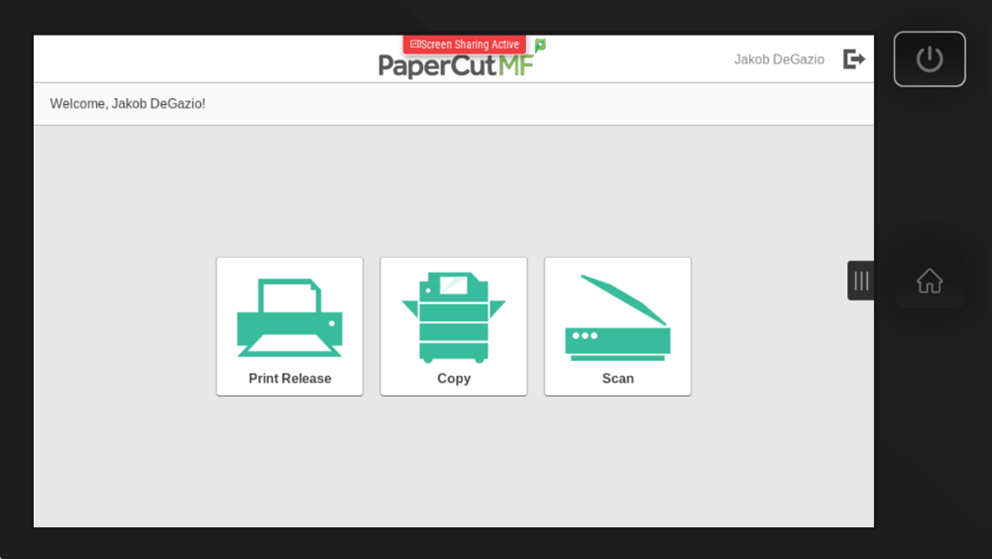
4. Simplified home screen: All Xerox MFPs will now feature a new, user-friendly home screen that simplifies navigation and access to essential functions.
5. Document processing on all scan jobs: All scan jobs will have OCR (Optical Character Recognition) enabled by default. This will allow your scanned PDF files to be searchable and editable.
We believe these enhancements will improve your productivity and streamline your workflow. If you or your department requires any custom scanning workflows that are missing, please place an ITS Service Request.
If you have any questions or need assistance with these new features, please do not hesitate to contact the ITS Service Desk.
