

A message from Kathy Legros, manager, Payroll:
2021 T4 forms for all current full-and part-time employees are now available for download through the MyNC Portal.
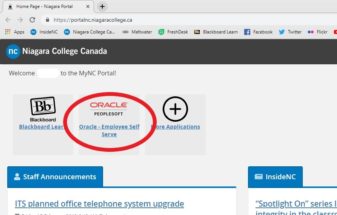
Staff and faculty can access their 2021 T4 by visiting the Oracle – Employee Self-Serve application on the MyNC Portal, and selecting ‘View T4 and T4A slips’ under ‘My Pay Information.’ Staff that are not currently active will have their T4s mailed to the mailing address on file.
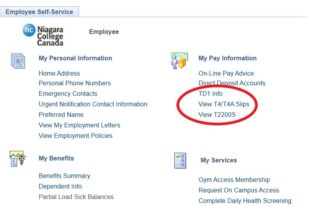
In addition, employees eligible for a ‘T2200S Declaration of Employment for Working at Home Due to COVID-19’ will also be able to access the T2200S form in Employee Self-Serve directly below their T4. Please note that you may need to allow pop-ups to download this form. For more information regarding the T2200S and claiming work from expenses on your personal tax return, please refer to the Canada Revenue Agency website.
For assistance accessing your T4 or T2200S through the MyNC portal, contact the ITS Service Desk at [email protected].
For assistance with specific questions regarding your T4, please contact the Payroll department at [email protected].
